Ultimate Guide: How to Care for and Maintain Your Studio Equipment
Your studio equipment is more than just gear — it’s the foundation of your sound. Whether you’re producing music, recording podcasts, or mixing content for clients, taking good care of your tools ensures consistent performance, longer lifespan, and fewer repair costs.
At Mindz Connect, we’ve worked with hundreds of creatives across Nigeria, helping them set up, upgrade, and maintain their studios. Based on real industry experience, here’s a complete guide on how to properly care for and maintain your studio equipment — from cleaning routines to professional servicing.
1. Keep Your Studio Clean and Dust-Free
Dust buildup is one of the biggest threats to studio gear. It affects buttons, jacks, and ventilation systems, leading to overheating and internal corrosion.
Best Practices:
Wipe consoles, monitors, and microphones weekly using a soft microfiber cloth.
Use compressed air to remove dust from control knobs and audio interfaces.
Install air filters or keep air conditioning running to reduce airborne dust.
Cover unused gear with protective cloths or dust covers.
Vacuum the studio floor regularly to minimize buildup around cables and gear stands.
Pro Tip: Keep drinks and food away from your mixing desk — liquid spills can cause irreversible damage.
2. Protect Your Gear from Power Surges
Nigeria’s inconsistent power supply makes surge protection essential for any studio. Voltage spikes can fry sensitive equipment instantly.
What You Need:
Voltage regulators: Stabilize current for sensitive gear like studio monitors and interfaces.
Power conditioners: Filter out electrical noise for cleaner signals.
Surge protectors: Shield devices from sudden current spikes.
Pro Tip: Unplug major devices during storms or long outages. For 24/7 setups, consider using an uninterruptible power supply (UPS) to avoid session interruptions.
3. Handle Cables Properly
Cables are often overlooked but are crucial for clean sound transmission. Poor cable handling causes signal drops, hums, or even short circuits.
Cable Care Checklist:
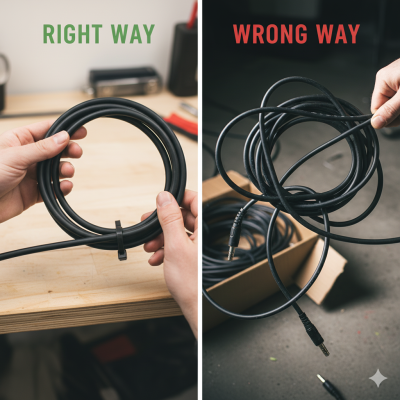
Always coil cables loosely — avoid sharp bends or knots.
Use Velcro straps or cable ties to organize cables neatly.
Label each cable to make reconnections faster after sessions.
Disconnect cables gently by holding the plug, not the wire.
Inspect connectors regularly for dust, rust, or loose pins.
Pro Tip: Invest in high-quality balanced cables (XLR, TRS) for longer life and reduced noise.
4. Update Software and Firmware Regularly
Many producers forget that keeping software and firmware updated improves sound processing, stability, and compatibility.
Routine Maintenance:
Check manufacturer websites quarterly for firmware updates.
Keep your DAW (e.g. FL Studio, Logic Pro, or Pro Tools) up to date for bug fixes and new features.
Back up your projects before updating.
Ensure your computer’s OS and audio drivers are compatible with your gear updates.
Pro Tip: Schedule updates during downtime — never in the middle of a client project.
5. Store Equipment Under the Right Conditions
Temperature and humidity greatly affect electronics, especially sensitive microphones, cables, and speakers.
Environmental Control Tips:
Maintain a room temperature between 20°C – 25°C (68°F – 77°F).
Use a dehumidifier to prevent rust, corrosion, and mold.
Keep windows closed to block moisture and dust.
Store microphones in padded cases with silica gel packs.
Avoid direct sunlight or heat sources near your gear.
Pro Tip: For long-term storage, unplug all cables and cover your equipment completely.
6. Schedule Routine Professional Maintenance
Even with careful handling, professional checkups ensure your setup performs like new.
Annual Maintenance Checklist:
Clean internal fans and vents in monitors, PCs, and racks.
Test all input/output ports for static or weak connections.
Recalibrate studio monitors for balanced frequency response.
Inspect acoustic treatment panels for wear or detachment.
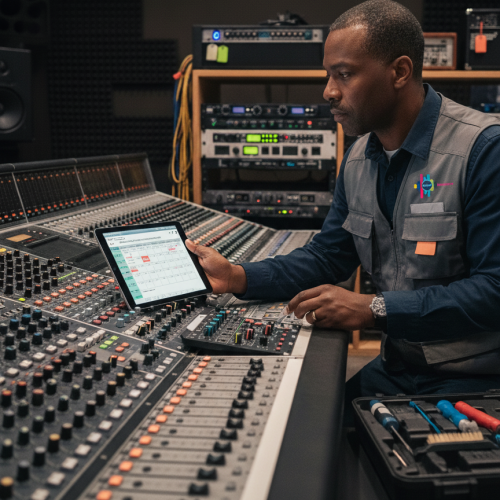
At Mindz Connect, we offer professional studio installation and maintenance services to help you preserve the performance of your recording gear. From acoustic recalibration to system rewiring, we keep your space sounding flawless.
Bonus: Maintenance Tips for Specific Gear
- Microphones
Always use a pop filter and dust cover.
Store upright in a case after every session.
Never blow directly into the capsule.
2. Headphones
Wipe ear pads after each use.
Replace worn-out pads or cables immediately.
Avoid pulling on cords when removing them.
3. Audio Interfaces & Mixers
Keep ventilation unobstructed.
Avoid stacking heavy items on them.
Disconnect unused ports to prevent dust entry.
Final Thoughts
Your studio equipment is a long-term investment — take care of it like one. With consistent cleaning, proper storage, and professional maintenance, you can extend your gear’s lifespan and keep your studio producing crystal-clear sound for years.
👉 Need expert help maintaining or upgrading your studio setup?
Contact Mindz Connect today for premium studio gear, professional soundproofing, and expert maintenance services across Lagos and Nigeria
📞 For orders and enquiries: +2348065511116, +2347072964600
🌐 Visit: www.mindzconnect.com